Your Family's FRS Benefits Are Frozen — Here's How to Get Them Moving
The moment the Division of Retirement learns about a death, the pension payments stop. Direct deposits get clawed back. The Health Insurance Subsidy terminates. And the state sends a stack of forms — but no instructions for which ones apply to your family or in what order to file them.
Meanwhile, you're fielding calls from three separate agencies (Division of Retirement, Alight Solutions, and the employer's HR department), trying to figure out whether the deceased was in the Pension Plan or Investment Plan, which retirement option they selected years ago, and whether a beneficiary form was ever filed after the marriage.
The FRS Survivor Claim Roadmap puts every step into a single sequence — from the 72-hour notification call through the first survivor payment — so you know exactly what to file, where to send it, and what happens if something is missing.
What's Inside
- The 72-Hour Notification Protocol — who to call first (Division of Retirement vs. Alight Solutions vs. MyFRS), what information to have ready, and how to stop the clawback from draining the joint account before you can act
- Plan-by-Plan Claim Pathways — separate step-by-step sequences for Pension Plan, Investment Plan, and DROP deaths, because each goes through a different agency with different forms, different phone numbers, and different deadlines
- Option 1–4 Decoder — what each retirement option means for the surviving beneficiary, how to find out which one the retiree elected, and the difference between a lifetime continuation (Option 3) and a reduced joint benefit (Option 4)
- DROP Balance Claim Walkthrough — the dual-payout process (lump-sum balance claimed on Form FST-11g, with the beneficiary named on Form FST-12, plus the monthly pension transition), updated for the 2023 SB 7024 changes that expanded DROP to 96 months at 4.0% annual interest
- In-Line-of-Duty (ILOD) Benefits — the 50% vs. 100% salary continuation rules by membership class, the documentation required to establish an ILOD determination, and the Investment Plan transfer option
- Health Insurance Subsidy Continuation — how the $7.50-per-year-of-service formula works (minimum $45, maximum $225 after SB 7024), the difference between Form HIS-1 (Pension Plan) and the HIS-IP packet (Investment Plan), and the 6-month retroactive cap
- Social Security After the WEP/GPO Repeal — what the January 2025 Social Security Fairness Act changed, who should file a new claim, and how to verify the retroactive adjustment
- Tax & 1099-R Guide — which entity reports which distribution, the 20% federal withholding on lump-sum cash payouts, and the rollover mechanics that avoid the immediate tax hit
- Document Checklist & Call Scripts — a printable Document Checklist covering Pension Plan, DROP, Investment Plan, HIS, SSA, and employer paperwork, plus word-for-word scripts for the 72-hour notification call, the follow-up status check, and the MyFRS/Alight call
- Survivor Claim Tracker — a log for recording every call, every reference number, and every form submission date, so nothing slips through during the 3–6 week processing window
- Benefit Comparison Worksheet & Distribution Decision Planner — record the Division's Option 3 vs. refund figures, and work the 20% withholding math on a DROP or Investment Plan cash vs. rollover vs. split election
- HIS Continuation Worksheet — calculate years × $7.50, pick Form HIS-1 or HIS-IP, and track the 6-month retroactive cap and State Group Insurance continuation
Who This Is For
- Surviving spouses of Florida public employees or FRS retirees who need to file for a continuing monthly benefit
- Adult children managing the claim process on behalf of a grieving parent — the guide puts each step in order so you can handle it alongside your own schedule
- Named beneficiaries on Form BEN-001, FST-12, or IPBEN-1 who need to understand whether they receive a monthly annuity, a lump sum, or a contribution refund
- Executors and personal representatives who need to identify which FRS assets pass outside probate and which require court documentation
Why Not Just Use the FRS Website?
The Division of Retirement publishes the statutes, the forms, and the handbook — for every member type, in every membership class, at every account status. The result is a dense reference manual written for the system's internal staff, not for a family that just lost someone and needs to know what to do this week.
This guide reorganizes the same official rules into the order a family actually encounters them: report the death, identify the plan and option, gather the documents, file the claim, follow up on the payment. It does not replace the FRS website — it puts the website's own rules into a sequence you can follow without being a benefits administrator.
What This Guide Does Not Do
It does not provide financial, legal, or tax advice. It does not tell you which payout option is best for your family. It does not recommend an IRA provider or a financial adviser. It explains the rules and the trade-offs of each choice, and the decision stays with you.
Satisfaction Guarantee
Full refund, no time limit. If the guide does not help your family, email [email protected] and we will process your refund.
Free Checklist vs. Full Guide
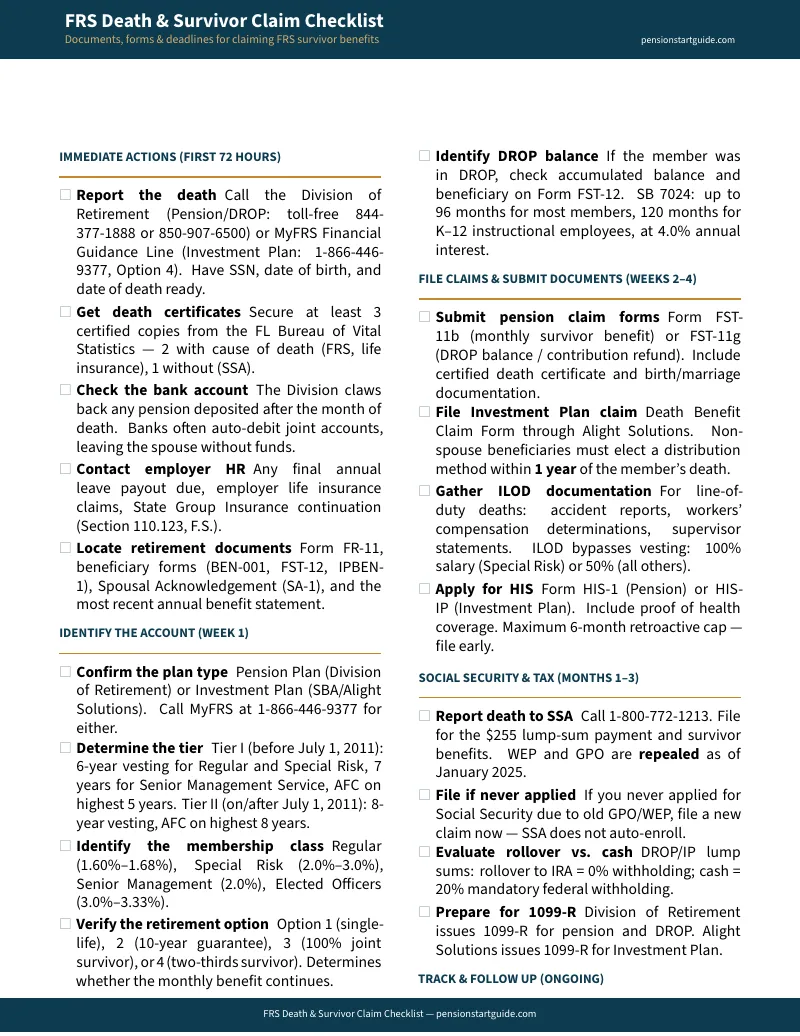
The free FRS Death & Survivor Claim Checklist gives you the documents, contacts, and deadlines in a two-page printable. The full guide gives you the explanation behind each step, the worked examples, the Benefit Comparison Worksheet, the Distribution Decision Planner, and the call scripts — everything the checklist tells you to do, plus how to actually do it.
Download the free checklist to see the structure, then decide whether the full guide is right for your family.